Introducing OSC2 Studio v0.0.1 — Execution Engine, Unified Preview, and A Smarter Editor

This release brings the execution engine, unified preview module, syntax highlighting improvements, and workspace enhancements.
Execution Engine — Run Scenarios Online
v0.0.1 introduces the initial execution engine. You can now run scenarios directly from the editor with one click and see the results in real-time preview.
Currently supported:
- Scenario elements:
vehicle,mapand other basic element parsing and loading - Drive action: Execution of the
driveaction - Modifiers: Support for
speed,lane,positionand other modifiers
This is the first step — the execution engine is actively evolving.
Code Completion — Syntax Tree Driven Context Completion
The editor now features syntax tree driven context completion. Based on the cursor position, the grammar tree automatically lists valid candidate keywords, helping you write scenarios more efficiently and reducing the need to reference documentation.
Integration & Optimization — Faster Loading, Smoother Experience
Syntax checking, scenario preview, and code completion used to be handled by separate modules, each requiring repeated loading. Now they are integrated — the parsed syntax tree is reused across features, resulting in noticeably faster page loading and a smoother overall experience.
The preview experience has been improved too:
- No more keyboard capture: Close the preview and keyboard input returns to the editor immediately. No browser restart needed.
- No more stretched display: Correct aspect ratio — what you see is what you get.
- Vehicle models in preview: Ego vehicle in white, NPCs in red — previews look more realistic
- Map auto-sync:
.xodrfiles from your workspace are automatically synced. No more "map not found" errors.
Editor Experience, Refreshed
Better Syntax Highlighting — Code Structure at a Glance
Syntax highlighting has been improved. Different syntax elements are now color-coded, making the code structure clearer and easier to read:
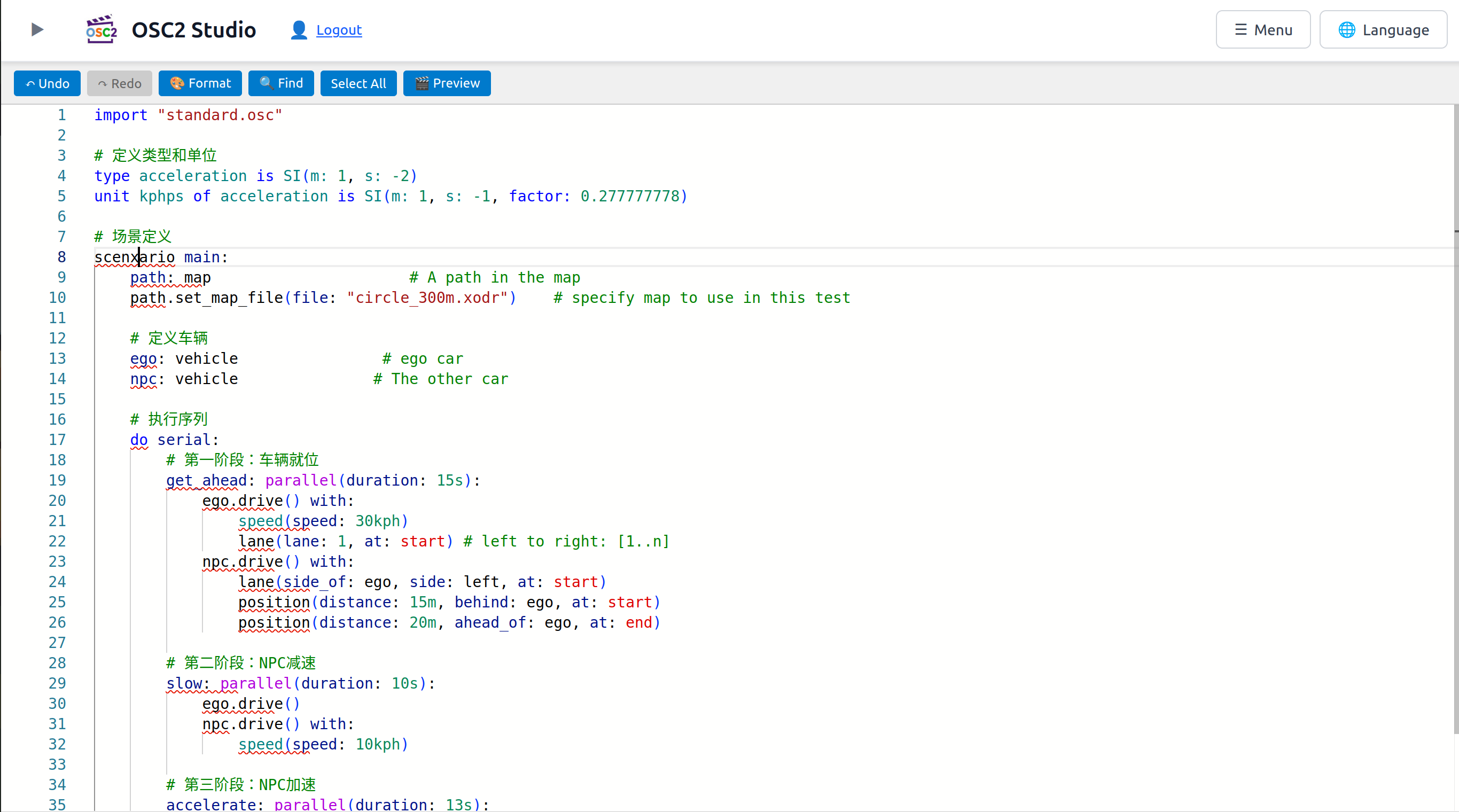
| Color | What it highlights |
|---|---|
| Light blue | Named arguments: file:, lane: |
| Purple | Composition operators: serial, parallel, one_of |
| Red | Event references: @event_name |
| Green | Hex literals: 0xFF |
Coloring also added for .. (range operator), ? (ternary), ! (enum delimiter), and keywords including call, emit, range, it, default, hard.
The editor theme now follows the app's dark/light toggle — switch to dark mode and the editor switches to a dark color scheme seamlessly.
Workspace, Now Smoother
- Auto-generated
main.osc: No more staring at an empty file list on first visit - Right-click context menu: Copy full file names with one click
- Hover tooltip: Long filenames show their full path on hover
- Delete moved to context menu: Removed the one-click delete button to prevent accidents
Documentation Site Goes Live
A brand new documentation site is now live, featuring two sections:
- User Manual: From quick start to scenario authoring, step by step
- OpenSCENARIO 2 Reference: Complete language syntax, type system, and validation rules
Available in both Chinese and English, with built-in search for quick reference.